roles-users

New feature: ROLES

HTML5 chat and roles

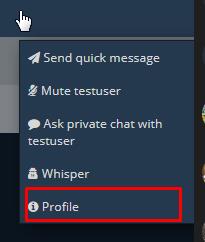
We recently added roles features so users can define with precision what features and options will be available to each user.

This features gives more flexibility to user rights. For now he have 5 roles:

guest

This should be used as visitor only with no rights at all. Just to discover the chat

user

Normal user with limited rights

dj

Same as user: should be able to lunch some youtube videos or do a broadcast to other users

moderator

Should have all rights, except permanant ban rights

admin

Have All possible rights

custom1, custom2, custom3

These are custom roles that you can use as you want


Each role has his own chat rights and features

You are of course free to assign right to each role and assign a role to an user:

Role Role
Can kick
 yes/no
Can ban
  yes/no
Is user visible ?
  yes/no
Can Broadcast
  yes/no
Can Stream
  yes/no
Can watch
  yes/no
Can Send Text
  yes/no
Can send private text
  yes/no
Can post youtube
  yes/no
Can open any webcam
  yes/no
Can whisper
  yes/no
Can quick message
  yes/no
Can ask for private chat
  yes/no
datingscript

html5 and datingsite integration

How to integrate html5-chat and datingscript ?


Here is a snippet to help you to integrate html5 chat and dating script.


Just edit $password and $webmasterid variables


<?php
ini_set('display_errors', 1);
error_reporting(E_ALL);
require '../vendor/autoload.php';
include('../application/config.php');
use \Firebase\JWT\JWT;
session_start();

if (!isset($_SESSION['session']['username'])) {
    header('Location:' . $config['base_url'] . 'users/login');
    exit;
}
$password = 'YOUPASSWORD HERE';
$webmasterid = 'YOUR SCRIPT ID HERE';
$gender = isset($_SESSION['session']['data_genre']) && is_array($_SESSION['session']['data_genre']) && $_SESSION['session']['data_genre'] ? (key($_SESSION['session']['data_genre']) == 1 ? 'Homme' : 'Femme') : '';
$avatar = isset($_SESSION['session']['picture_file_path'], $_SESSION['session']['picture_file_name'], $_SESSION['session']['picture_file_ext']) && $_SESSION['session']['picture_file_path'] ? $_SESSION['session']['picture_file_path'] . '/' . $_SESSION['session']['picture_file_name'] . '.' . $_SESSION['session']['picture_file_ext'] : '';
if(!$avatar) {
    $avatar = '0.svg';
}

$mysuer = array('webmasterid' => $webmasterid, 'password' => $password, 'username' => $_SESSION['session']['username'], 'gender' => $gender, 'role' => 'user', 'image' => $config['base_url'] . 'uploads/' . $avatar);
$encoded = JWT::encode($mysuer, $password);
?>
<!DOCTYPE html>
<html>
<head>
	<meta charset="utf-8">
	<meta http-equiv="X-UA-Compatible" content="IE=edge">
	<title>Html5 chat</title>
	 <meta name="viewport" content="width=device-width, initial-scale=1">
</head>
<body>
<div class="main">
    <div style="width:100%; height:100%;">
        <script src="https://html5-chat.com/script/<?= $webmasterid ?>/<?= $encoded ?>"></script>
    </div>
</div>	
</body>
</html>
phpfox

How to integrate html5 chat into phpfox

How to integrate html5 chat into phpfox ?

step 1: download the phpfox module here

step 2 : open file

\PF.Base\module\html5chat\template\default\controller\index.html.php

and edit these lines 16-17

$webmasterid = xxxx; // ENTER your script id (webmasterid) here
$password = 'my secret password'; // ENTER your HTML5 password here

and fill with your own data

step3: open your website https://yourwebsite.com/ws/index.php/html5chat

You will be loggedon with your username, gender, avatar and role

protect

JWT: a quicker and simpler version using the HTML5 service

Here is a quicker and simpler version of integrating  HTML5 chat into an existing website than the JWT version described in that post

The bottom sample is a PHP sample, but you can easily adapt it to JS or ASP in needed. let assume your webmasterid = 1050

Step 1: you create an array of your user such as:

$json = json_encode([
    'webmasterid' =>'1050',
    'username'  =>'myUsername',
    'password'  =>'myChatAccountPassword',
    'gender'    =>'male',
    'role'      =>'user',
    'image'     =>base64_encode('https://html5-chat.com/img/malecostume.svg'),
    'profile'   =>'https://monsite.com/profile/myUserername',
    'birthyear'=>1970
    ]
);

Step 2 : you encode it using the html5 JWT online service

$encoded = file_get_contents("https://jwt.html5-chat.com/protect/".base64_encode($json));

Step 3 : you inject that encoded string into your JS script

<script src="https://html5-chat.com/script/<?=$webmasterid?>/<?=$encoded?>"></script>

And that’s ALL:

role : can be admin,  user, guest,  dj, custom1, custom2, custom3

avatar is the http:// image of the expected avatar

profile: the link to the user profile (if available)

startRoom : the id of the room where to start in (roomid is an integer number)

Replace the webmasterid in script by your script id (webmasterid, a positive integer you can find in your chatadmin panel)

If you want to use JWT on your server, please refer to this post.

<?php $json = json_encode(['username'=>'myUsername', 'password'=>'myPassword', 'gender'=>'male', 'role'=>'user', 'profile'=>'https://monsite.com/profile/myUserername', 'image'=>'https://html5-chat.com/img/malecostume.svg']);
$encoded = file_get_contents("https://jwt.html5-chat.com/protect/".base64_encode($json), 'startRoom'=>5);
?>
<!doctype html>
<html lang="en">
<head>
    <meta charset="UTF-8">
    <title>HTML5 chat</title>
</head>
<body>

<div style="width: 1024px;height: 800px;">
    <script src="https://html5-chat.com/script/xxxxx/<?=$encoded?>"></script>
</div>

</body>
</html>

Notice: if file_get_contents is DISABLED on your hosting, you can use the curl

$curl= curl_init();
curl_setopt_array($curl, array(
      CURLOPT_RETURNTRANSFER => 1,
      CURLOPT_URL => "https://jwt.html5-chat.com/protect/".base64_encode($json)
));
$encoded = curl_exec($curl);

webrtc

HTML5 goes webrtc now !

A very import news : HTML5 chat enables WEBRTC support

webrtc
webrtc

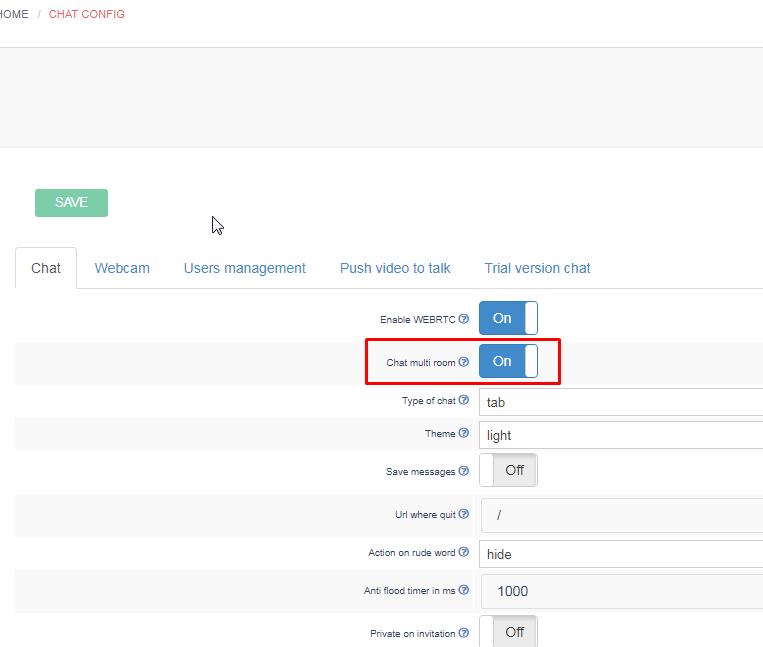
that’s a great news: HTML5 supports both: Flash and Webrtc : you can choose that feature from your chatadmin panel.

Each technology has pros and cons:

Flash

Flash is used for streaming – that means ONLY flash based devices could stream. However all devices can watch the video.
Those with flash have real time video. Those without use HLS and have about 5 seconds of delay.

Webrtc

Webrtc is used for both streaming and playing. This technology is for now ONLY supported by chrome and Firefox browser.
It also works on Android.
Quality is superior to flash. It also includes a better echo cancellation algorithm.

However the latest Safari11 and IOS11 webrtc support is insufficient. Safari uses the old H264 codec. Besides, teh IOS webrtc support uses and old API

translate

How to translate html5 chat into your langage ?

You want to get html5 chat translated into your own langage ?

This is very simple:

Download the langage JSON resource from :

 https://html5-chat.com/lang/en.json

You can also chose the french, spanish, german as start

ex: https://html5-chat.com/lang/frjson

Edit this file with your favorite editor and change the values (not the keys) ex:

"chooseAnUsername":"Choose an username",

Change the second part “Choose an username” to your own langage and simply send us your new JSON file: we will upload it to our server